By
Powerel
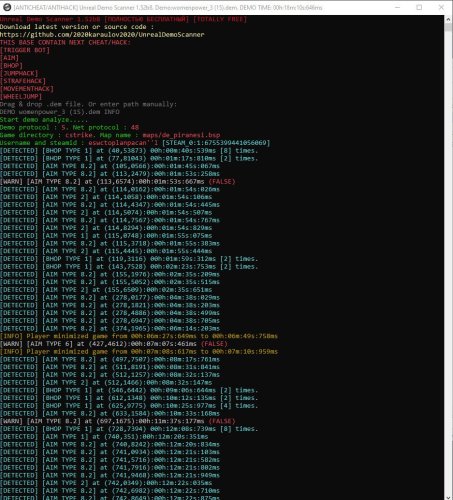
The .dem file scanner is designed to analyze and scan Counter-Strike 1.6 demo files for the presence of prohibited programs.
It does not require the game to be installed or even present on the computer, and unlike ViewDemoHelper, it can detect a large number of cheat programs without false positives.
Differences from ViewDemoHelper:
Advantages:
No need for the game to be installed
Works with clean input data
Detects all types of cheats released up until 2020
Ability to scan multiple demo files at once
Disadvantages:
Console application with no quick view of moments
Does not have access to the game API, so it consumes extra RAM to simulate the game engine's work and cannot catch some types of cheats (checking if the player is alive, what weapon they have, storing extra data in memory, etc.). Scanning a 100 MB demo file requires from 0.5 GB to 1 GB of RAM.
Scanning large demo files can take considerable time.
Installation and Running
Unzip unrealdemoscanner.zip into a separate folder
Run UnrealDemoScanner.exe
Drag the player's demo file into the console or enter the path manually
Press the Enter key once
Wait for the scan to complete
After scanning, you can enter one of the commands to view additional information
Description of Aimbots and Other Cheats
AIM TYPE 1 - Attack delay
AIM TYPE 2 - Autoattack with pistols
AIM TYPE 3 - Sharp aim jumps (incomplete)
AIM TYPE 4, FAKELAG - Fake lag
AIM TYPE 5 - Smooth angles/etc - Software angle smoothing
AIM TYPE 6 - HPP Autoattack - Autoattack from HPP v5
AIM TYPE 7 - HPP Trigger bot - Trigger bot (from HPP) or hard aimbot
AIM TYPE 8 - Universal AIMBOT detection
TRIGGER BOT, KNIFEBOT BOT - Old aim hacks
FPS HACK - Cheat allowing to bypass FPS limit, part of other cheats
CMD HACK - Game frame modification (e.g., CMD HACK TYPE 1 allows you to hang in the air)
MOVEMENT HACK - Software movement
DUCK HACK - Software crouching
JUMP HACK - Software jumping
Many other cheat features.
Command Line, Launch Parameters
-dump — saves the entire demo file in human readable text format, making it possible to read the demo file as text, can be used to analyze cheat programs without modifying the scanner's source code
-debug — outputs debug information
-alive — marks the player as alive at the beginning of the demo (forcefully)
False Positives
[WARNING] Alerts
may appear from time to time when the scanner considers the moment suspicious but not enough to consider it 100% cheat usage. Such moments should be reviewed manually. I recommend using View Demo Helper or similar programs to examine the moment accurately. In other words, having multiple warnings does not mean the player is a cheater unless you review the moments in the game.
[DETECTED] Alerts
are displayed when the scanner is absolutely sure that this moment is a cheat or a cheat script, and should not have false positives. (But due to some exceptional situations, I allow 1-2 false positives per 10-20 minutes of the entire demo length.)
Detects almost all cheats released up until 2020-2021, but modern cheats may not be detected by the scanner, so the absence of detections does not mean that the player is not a cheater.
0 downloads
.thumb.jpeg.83dce9ba87868512bce4705120e370c4.jpeg)


.thumb.jpg.c7ae81d861d04eb4ed90f5187729bf9a.jpg)
.thumb.jpg.85ba95257de36597f92369e999e4bf9b.jpg)
.thumb.jpeg.bbf92d75dd3ab1e52f81278e9e853d62.jpeg)